


For brokers, account funding is a key step between account opening and trading activity. Being sent to an external website, signing in again or searching for the correct trading account can add friction and may interrupt the deposit before it is completed.
MetaTrader 5 built-in payments bring the start of the funding process into the trading platform. Traders gain a clearer route to deposit and withdrawal functions, while brokers can connect supported payment providers through MetaTrader 5’s existing payment infrastructure.
MetaQuotes identifies fewer user actions, a shorter sales funnel and reduced development and maintenance requirements as key benefits of the service.
UniPayment is integrated with this built-in payment framework and is available through MetaTrader Administrator, giving brokers an established starting point for the provider connection process.
MetaTrader 5 includes a dedicated MetaTrader 5 Payments section. When enabled by the brokerage company, it gives traders access to supported deposit and withdrawal operations and displays the history of payment transactions initiated through the platform.
The payment methods and providers shown in this section are not fixed by MetaTrader 5. They depend on the payment methods and providers authorised by the broker.
This leaves the broker in control of which operations, methods and providers are made available to its clients, while giving traders a common funding entry point inside the trading platform.
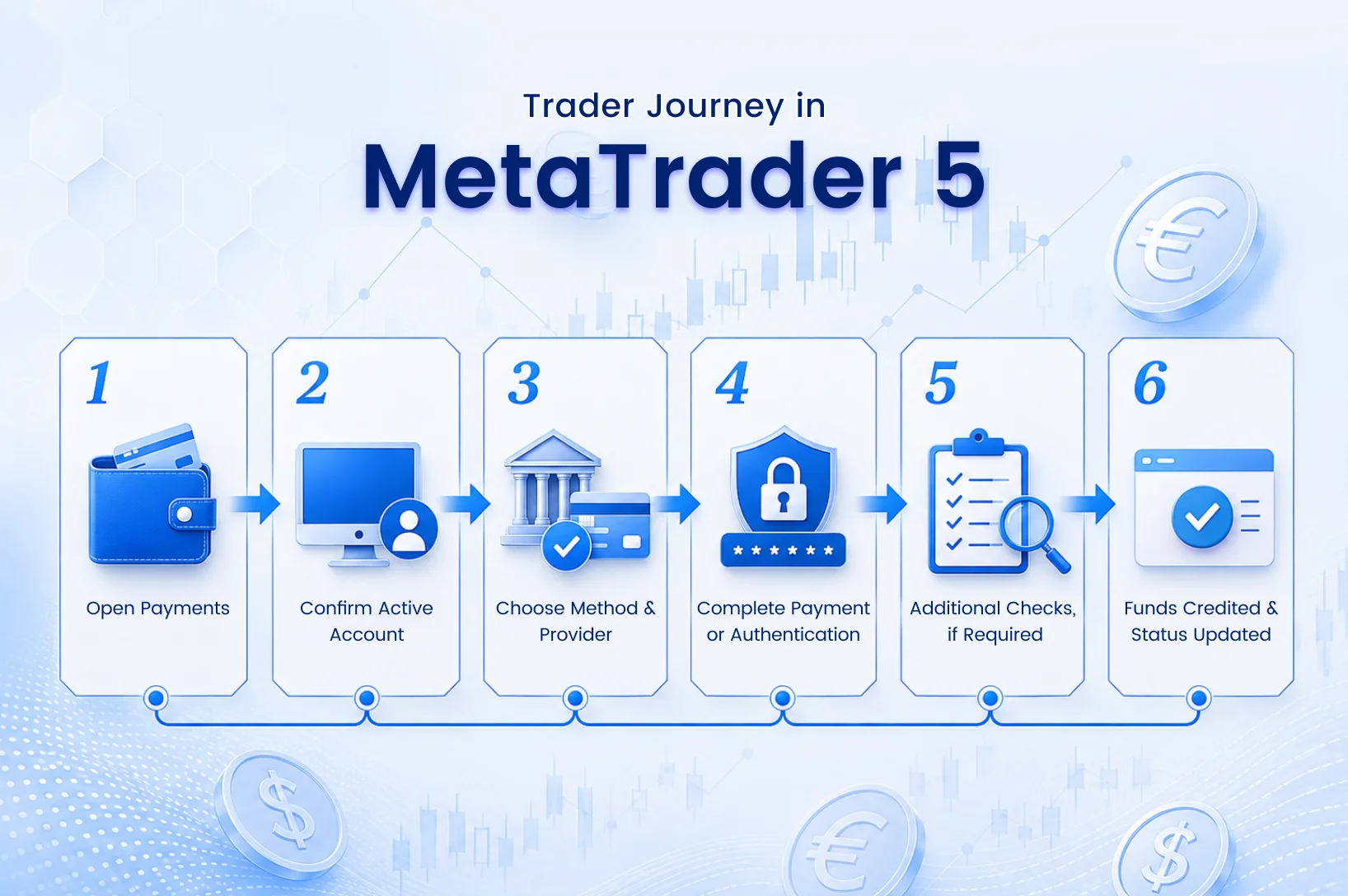
For a deposit initiated through the Payments section, the flow generally works as follows:
1. The trader uses the account currently active in MetaTrader 5
Funds are credited to the trading account active in the platform. To fund a different account, the trader first switches to that account.
2. The trader enters the amount and currency
Where the payment currency differs from the account’s deposit currency, conversion may take place when the funds are credited.
3. The trader selects an available payment method and provider
The options shown depend on the methods and providers authorised by the broker.
4. Payment details or authentication are completed where required
Depending on the selected method, the trader may be redirected to a secure payment-provider page to enter payment details or complete authentication.
5. Additional checks may take place before account crediting
Some brokers may conduct additional payment checks. Once the transaction is completed and approved, the amount is credited to the active trading account.
Transaction status and the history of payment operations initiated through the platform remain available in the Payments section. Transactions completed through other routes, such as the broker’s website, do not appear in this platform history.
“Built-in” describes where the funding process begins and how payment providers are connected to MetaTrader 5. It does not necessarily mean that every payment screen remains inside the MT5 interface.
For some methods, the trader will still enter payment details or complete authentication on a secure page operated by the selected payment system. After completing that step, the trader is returned to the Payments section.
The practical distinction is that the trader starts the funding process from the trading platform, using the account, payment methods and providers made available by the broker.
The roles can be understood as follows:
MetaTrader 5’s documentation states that payment transactions are managed by the brokerage company and that traders should contact their broker with payment-related questions.
MetaTrader 5 supports more than one way of presenting deposit and withdrawal access.
With the internal Payments section, traders can view the operations, payment methods and providers configured by the broker. They can also track platform-initiated transactions through the Payments history.
A broker may alternatively display deposit and withdrawal commands that direct the trader to funding pages on the broker’s own website. In that case, the internal Payments section is not shown. The links make the relevant pages easier to locate, but the funding process continues through the broker’s external website.
| Built-in Payments section | Broker website funding links |
|---|---|
| Funding starts in the MT5 Payments section | MT5 directs the trader to the broker’s website |
| Methods and providers are presented in the platform | Methods are presented through the broker’s web flow |
| Platform-initiated transactions appear in Payments history | Website transactions do not appear in MT5 Payments history |
| Uses MetaTrader 5’s payment-provider framework | Uses the broker’s separate website funding flow |
The difference is not simply where the deposit button appears. It affects where the funding journey begins, where provider options are displayed and where the transaction status can be followed.
A clearer funding entry point. Traders can access the deposit function from the same platform they use to monitor and manage their trading account, reducing the need to locate a separate cashier, broker website or client-area funding page.
An established provider framework. Brokers can work with payment providers already available through MetaTrader 5’s infrastructure rather than beginning by developing an MT5-specific connector.
Broker control over the setup. The broker still determines which operations, payment methods and providers are presented to clients. The same payment configuration is not automatically applied to every brokerage.
Less need to maintain a separate MT5 payment connection. MetaQuotes presents built-in payments as a way to lower the development and maintenance requirements associated with standalone payment solutions and simplify the trader’s funding journey.
Built-in payments handle a specific part of the payment architecture: the MT5 connection and the trader-facing funding entry point. The live payment service still needs to be configured with the selected provider.
UniPayment is integrated with MetaTrader 5’s built-in payment system. MetaQuotes has publicly featured UniPayment within this ecosystem and discussed the development of the integration with UniPayment Co-Founder Paul Mendoza.
Brokers can locate UniPayment through MetaTrader Administrator and begin the provider connection process from there.
Because the UniPayment provider connection is already available within MetaTrader 5’s payment infrastructure, brokers do not need to build the MT5 connector itself from scratch. This does not mean that the service is activated automatically: the broker must still complete the applicable commercial, compliance and configuration processes before going live.
The background to the integration and MetaQuotes’ feature on UniPayment is covered in our related News article.
MetaQuotes Features UniPayment’s Built-in Payment Integration for MetaTrader 5 →
Finding UniPayment in MetaTrader Administrator is the technical starting point, not the end of the implementation process.
Before launch, the broker must still complete the relevant commercial and compliance onboarding, agree the payment and settlement setup, and complete the required configuration and testing.
The setup typically needs to reflect:
UniPayment works with the broker through the relevant commercial, compliance and implementation stages. Available services depend on jurisdiction, the relevant UniPayment entity and the outcome of onboarding.
For brokers connecting UniPayment, the remaining work focuses on the commercial, compliance and operational setup required for launch.
The objective is not simply to place another payment option inside MetaTrader 5. It is to connect the MT5 funding entry point with a payment setup that fits the broker’s client base and operating requirements.
1. Does MetaTrader 5 process client payments?
No. MetaTrader 5 is not the payment service provider. It provides the Payments interface and provider framework. Payment services are supplied through providers authorised by the broker, while the brokerage company controls availability, manages payment transactions and handles client payment enquiries.
2. Do built-in payments eliminate every redirect?
Not necessarily. Some payment methods require the trader to enter payment details or complete authentication on a secure provider page.
The funding process still begins from the MT5 Payments section, and the trader returns there after completing the external step.
3. Can brokers choose which providers and methods appear?
Yes. The availability of payment methods and providers depends on the broker and its arrangements with the selected providers.
4. What is required before UniPayment can be activated?
The broker must initiate the provider connection, complete UniPayment’s commercial and compliance onboarding, agree the applicable payment and settlement setup, and complete the required platform configuration before activation.